
Automation you can watch at work.
Mikofy Engine connects the systems you already use and automates the work that repeats every day. Every run logged, every failure caught, every exception with the right person.
- n8n
- Make
- WhatsApp Business API
- Claude
- ChatGPT
- custom code
Look inside the Engine.
- Your business×1
Engine sits between the systems you already have. Departments pass data to each other without anyone retyping it.
- One process×8
Finance: a purchase invoice goes from the mailbox to the bank. Five steps, and nobody retypes a thing.
- One step×64
AI reads the invoice. Every field is checked against what you already know: purchase order, supplier and IBAN.
- The data×512
This is as deep as it goes. This is recorded for every step, so you can always see what happened.
Scroll to zoom in
Finance · purchase invoice
| Concrete kerbs 100×20×6 | 400 pcs | €2,400.00 |
| Paving sand | 60 m³ | €1,475.00 |
| Clay pavers | 28 m² | €1,190.00 |
| Transport | 1 | €135.00 |
| + 3 lines | €2,800.00 |
- Subtotal
- €5,200.00
- VAT 21%
- €1,092.00
- Total
- €6,292.00
IBAN NL91 ABNA 0417 1643 00
Sample invoice with made-up data- Supplierknown in Exact Online
- Invoice numbernot booked before
- IBANmatches supplier records
- Linesmatch purchase order PO-2291
- VAT21%, matches the lines
- Total €6,292.00above €5,000: approval needed
{
  "run": 4812,
  "step": "ai.read",
  "source": "invoice-2026-0418.pdf",
  "supplier": "Van Dam Building Supplies Ltd",
  "actor": "svc-exact (book only)",
  "iban_check": "ok",
  "purchase_order": "PO-2291",
  "total": 6292.00,
  "deviations": [],
  "approval": "teams",
  "next": "exact.book",
  "stored": "EU · log",
  "duration_ms": 1840,
  "attempt": 1
}
This is how one step appears in the log
- ai.read started
- 4 lines, VAT and IBAN found
- 6 checks: 5 passed, 1 threshold
- recorded in the log (EU)
- on to exact.book
Run one yourself.
Pick a process, take a connection down or approve an invoice. This is how every automation we build behaves.
Start with the systems you already have.
Tick what you use. You will see right away where we usually start and which system leads.
Accounting and ERP
CRM and sales
Web shop and payments
Office and email
Communication
Data and documents
AI
No integration available? Then a software robot takes over the clicking and typing, just like an employee would.
Proof, not promises.
We do not name clients we do not have or show numbers we cannot back up. This is what we built and what is running.
Mikofy runs on Engine itself.
Our own system handles leads, projects, the team and our content. Built by us, hosted by us, running day and night.
- Website form → lead in our system → alert to the team, with duplicates filtered out and limits against spam.
- Content calendar → publishing to Instagram through the Meta API.
- A scheduled job every hour, with a lock against double runs and an alert after three hours of silence.
- Visitor statistics without cookies and without storing IP addresses.
- Team app with roles, invitations and an app on the phone.
Platform for Slabstraat.
A web shop for graded trading cards with its own stock logic. Every card goes through fixed steps, and the system makes sure a single copy can never be sold twice.
- Catalogue import from the client’s own file.
- Stock as a state machine with fixed transitions.
- Live updates to every visitor at once.
- A price job connected to an external price source.
- Admin panel and 28 automated tests that check every change.
- Pulled1/5
- In storage2/5
- Offered for buyback3/5
- Bought back4/5
- Moved5/5
From timesheet to invoice.
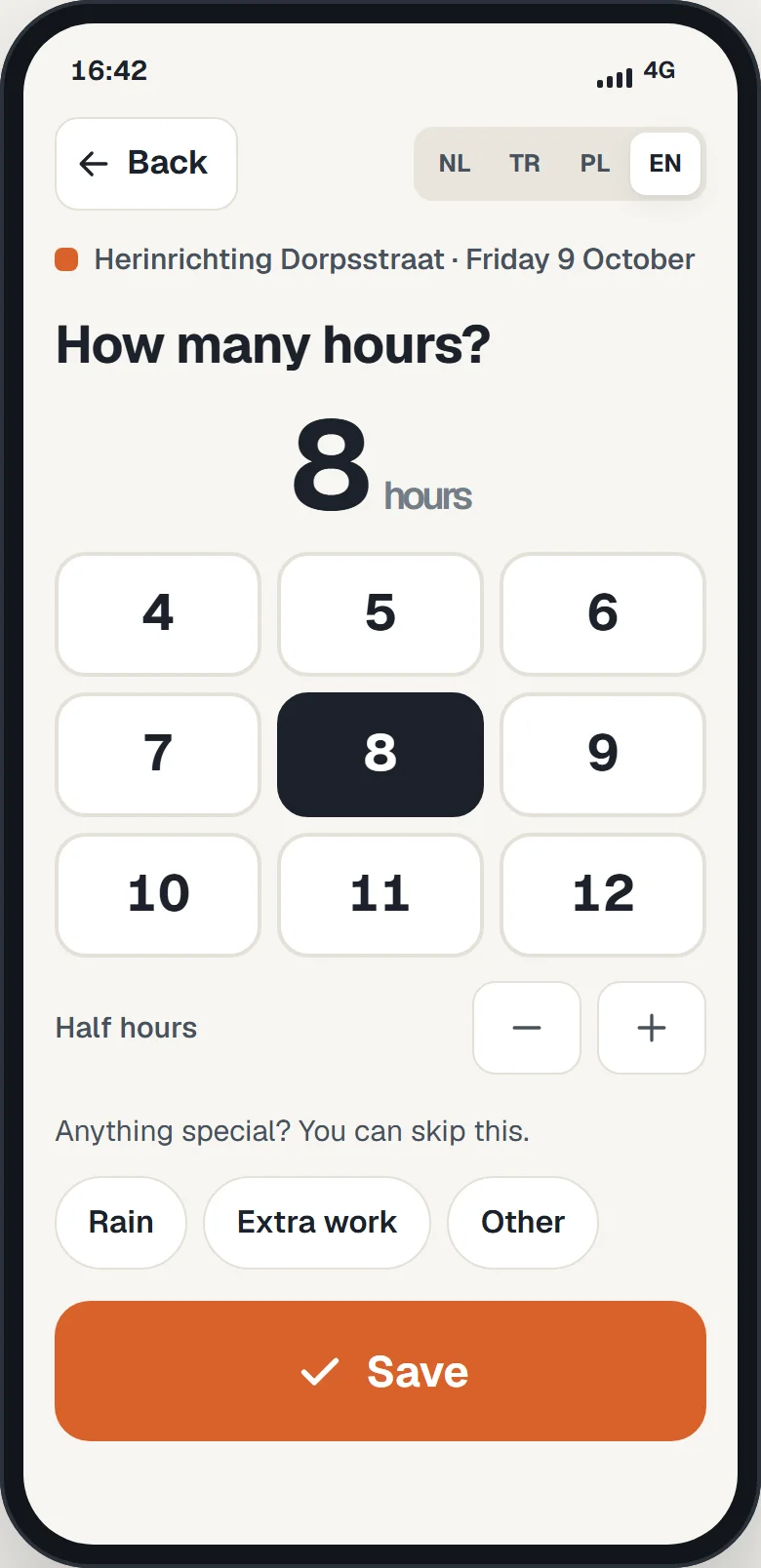
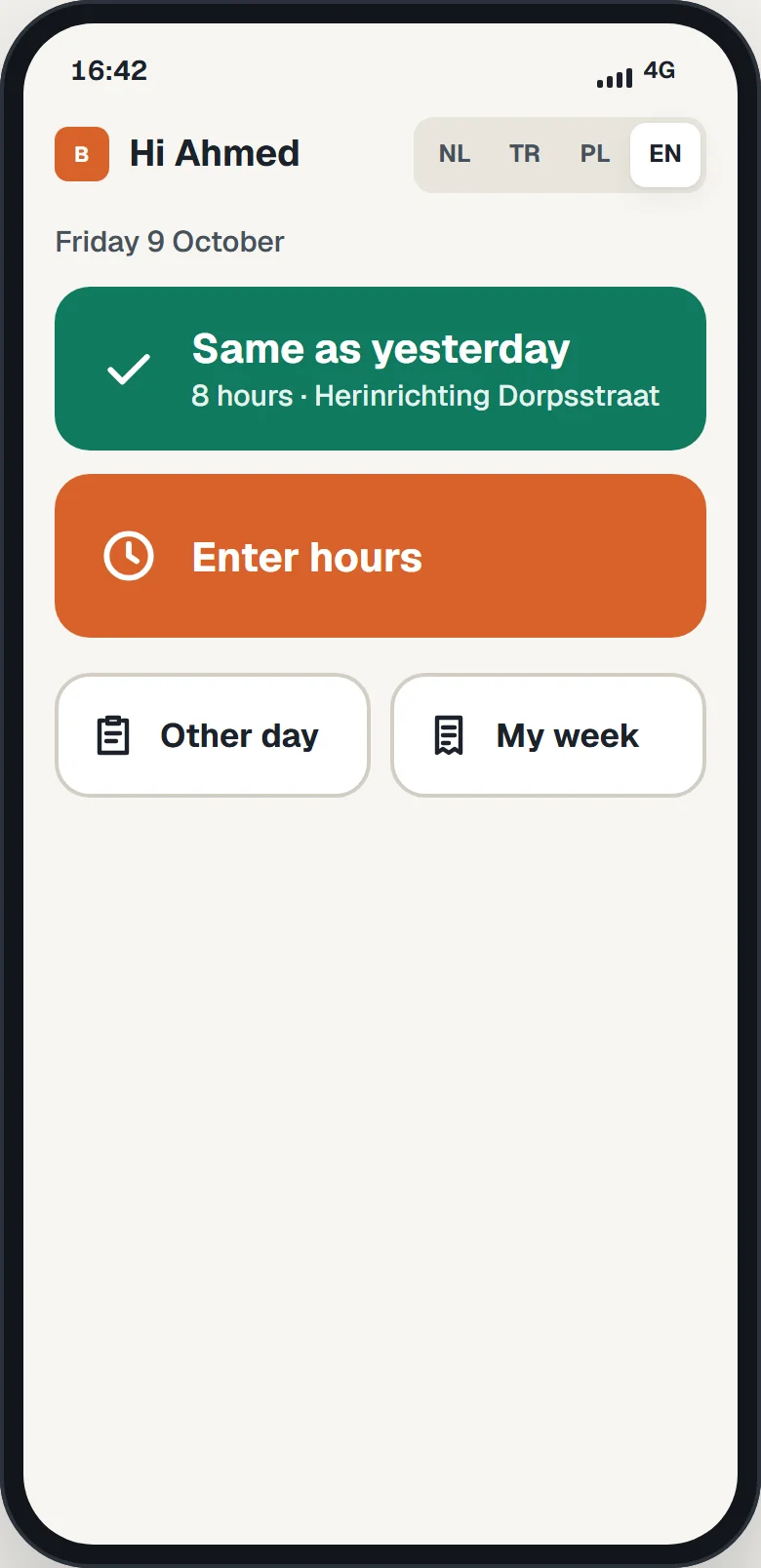
For a paving company with crews on several projects we built a clickable demo: workers log hours on their phone, the register fills itself, the project lead signs the job sheet and the invoice is ready.
- One question per screen and big buttons, in the worker’s own language.
- Works without signal and syncs later.
- A reminder at 5 pm to anyone who has not logged hours.
- Differences between hours and job sheet are flagged instantly.
- Hours, revenue and margin per project in one overview.
Try the demo
How we work.
Five phases, each with what you get. Before we start, we agree on what we build and when.
Analysis
We walk through your processes and see where hours and money leak away.
You get- A map of your key processes
- Hours per week, per process
- A phased plan: quick wins first
Design
You see up front how it will work, so you know what you get before we build.
You get- A flow diagram per process
- Screens where people need to act
- Agreements on data, access and exceptions
Building in short cycles
Step by step, with your team testing along the way.
You get- Working parts after every cycle
- Logging and error handling from day one
Launch and training
We take it live, connect everything and walk your team through it.
You get- A runbook per process
- Training for everyone who uses it
Support and growth
We keep an eye on it and keep building as your business grows.
You get- Monitoring and alerts on failures
- Quick fixes and extensions
The price is always tailored. After the free scan you get a proposal that fits what you need.
What if something goes wrong?
Pick a situation and watch what Engine does. This is how we build every automation: failures get caught, not hidden.
Simulation. How it works for you is set down in the runbook for each process.
Questions from IT and management.
What we hear most often, with the answers we put in writing up front.
Where is the data stored?
We agree up front where everything is stored and who can access it. Within the EU wherever possible, set down in a data processing agreement.
Who has access?
A separate account per integration with only the permissions it needs. Accounts and keys stay yours.
What happens when something fails?
First an automatic retry, then an alert to a named person. Nothing disappears silently.
Can we see what happened?
Every run is logged: when, what and with which data.
Who decides?
Above a threshold for amounts or exceptions, a person decides. You set the thresholds.
Are we locked in afterwards?
No. Every process comes with documentation and a runbook, and workflows can be exported.
What about GDPR?
We only process the data that is needed and agree on retention periods.
What does automation cost?
That depends on what you want to automate and which systems it needs to talk to. After the free scan you get a tailored proposal, with clear agreements up front about what we build.
How long does it take?
We build in short rounds, so you can test a first working part quickly. How long the whole thing takes, you’ll hear after the scan.
Can you really automate anything?
Almost anything that repeats, yes: from email and documents to integrations between systems and complete workflows. Sometimes a small change in how you work is smarter than software, and then we’ll tell you so.
Do we need to buy new software?
Usually not. We build around what you already use and get your systems talking to each other.
My people aren’t technical. Will this work?
That’s exactly what we design for: simple screens, clear buttons and their own language. Mostly they just notice that work disappears.
Which businesses do you work for?
Every industry and every size: from a team of five to companies with several locations. It always starts with finding where most of your time leaks away.
We do not hold an ISO 27001 certificate. Does your organisation use a supplier questionnaire? We are happy to fill it in.
Show us what costs you time.
We get in touch within 24 hours to plan the scan. Twenty minutes, by video or on site.
- We get in touch within 24 hours
- 20-minute scan
- Report and tailored proposal, even if you do not continue
You talk to the people who build it.
No account manager, no being passed around. The people who map your processes also build them and stay your point of contact after launch.
Rather get in touch directly? WhatsApp · info@mikofy.com